My questions are a little longer than others I’m seeing so far on the forum, so thanks in advance for whomever is willing to read it. Hopefully thoughts are plenty clear and not-redundant.
After watching several videos from Just Josh’s channel, as well as some others, I have some questions/data needs about the Lenovo Yoga Pro 9i Aura 16 inch laptop. (I’ll just call it the Yoga Pro from here on.)
As quick context, I plan on running Linux for the first time (something like Ubuntu) to try & closely resemble MacOS on an M Series chip. A majority of the apps I use are already open-source, except my video editor (Final Cut)… BUT I do have limited DaVinci Resolve experience for some specific visual effects like planar tracking.
First:
The various tests (e.g. power consumption of CPU and GPU) that he has in his videos are presumably while running Windows. I’d like some real info on power consumption while running Ubuntu or a similar Linux Distribution.
I’ve been very accustomed to using a 3rd party power adapter from a reputable brand which can supply 100W of power with a second device plugged into one of the other adapter ports. It’s always been plenty more than I’ve needed. I use a charging cable with an LED wattage indicator sometimes, and I’d be hard pressed to say I’ve ever seen it exceed even 50W continuous while doing video editing. Usually it sticks around 20W to 30W.
Per the videos from Just Josh, the Yoga Pro needs a 170W power brick to prevent battery drain???
If my most intensive tasks are:
- Video Editing in DaVinci (3, maybe 4 4K clips on top of each other, but otherwise 1 4K clip with some text, .png elements, some keyframed animations, and maybe some visual effects like planar tracking),
- Exporting while I switch over to some other tasks (perhaps the most demanding of which could be another video project or a photo editor like Affinity),
do I absolutely need a 170W power brick, or can I use my 3rd party adapter?
Point being, I don’t plan on trying put it under the most hardcore workload…. or even doing that all the time. Sometimes it’s just chill office work or maybe some more involved research with some browsers.
Second:
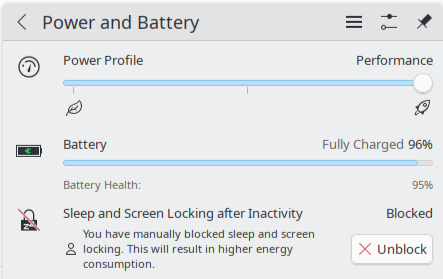
Kind of attached to the first question, but if I run Linux, does that effect the power modes the Yoga Pro can actually run in (more options? less? to manage power)
Third:
Can I use Apple peripherals and program trackpad gestures?
Fourth:
Does anyone sell a Thunderbolt 4-to-Lenovo’s proprietary charging adapter/cable?
Aside from those four things, I feel like I have a decent understanding of the machine and am leaning in that direction. Don’t really want to go with Gigabyte because of what Josh said about their poor service and ranking them as a company. Lenovo sounds like the next best brand before Apple, and they have good enough service.
Anyone who is more knowledgeable with all the internals and what exactly to spec it with (aside from 1TB SSD, 32-36GB of RAM)(and rough cost), I’d definitely appreciate insight. Just know I’m a bit of a novice since I’m coming from Apple where the assortment is simpler and it’s built to be more power efficient out-of-the-box.
Though power consumption is my main concern, my preferred features overall are:
- Install Linux out of the box… NO Windows on the hard drive at all
- NVIDIA GPU, since that apparently is preferred for DaVinci to fully work???
- Multiple Thunderbolt 4 ports (I’m very used to USB C for accessories since I’m coming from Apple)
- Display par or better than MacBook. I like my stuff crisp & clear! (If I’m switching to a “PC,” I want it to feel nice! 120Hz refresh is appreciated, but my Studio Display I use most of the time is capped at 60Hz. NOT SURE if I would get something else… may not be enough cost difference between what I paid for it and the alternatives to justify selling & switching)
- 16 inch screen is a MUST for a portable powerhouse. I like my screen real-estate
- Can use Apple Peripherals (trackpad at minimum) with most of features somehow
- Can run on 65W of power for Video Editing/Exporting in DaVinci (my power bank is a beast, but goes from 140W in one port, to 65W with a second port also being used…. NOT SURE if I’d have to find a different process here)